On Your Radar
Perplexity Launches its New Computer Platform
Perplexity just dropped its most ambitious product yet. The Computer platform coordinates 19 different AI models to tackle complex workflows entirely in the background. Whether you need research, coding, design, or deployment work, it assigns the right specialist model for each subtask. It's currently exclusive to Max subscribers at $200 monthly, but this multi-agent orchestration approach could reshape how we think about AI tools.
Claude Code Goes Mobile with Remote Control
Anthropic launched Remote Control for Claude Code, letting developers seamlessly hand off terminal sessions to their phones. It's genuinely useful, says Kieran - "I've been able to continue working on projects while going to pick up family".
Qwen 3.5 Runs Completely Offline on iPhone
There are some new ultra light AI models on the block, so small Qwen 3.5 can run entirely locally on an iPhone 17 in airplane mode. No internet required, no data leaving your device, no monthly fees. While it's still early days for on-device AI, this demo suggests we might not need cloud-dependent AI services forever. Local processing could be the future for privacy-conscious users and businesses.
Automating Documentation with AI
Create With co-founder James posted about this automated system he built for keeping his app's documentation updated, complete with nice screenshots. We're at risk of running out of things to automate.
Deep Dive: Notion's Custom Agents Just Changed What "Automation" Means
We're always happy when a technology becomes more accessible for the average person. Zapier Agents paved the way with their "build your agent as if you're writing an email" interface.
And now Notion just quietly dropped what might be the most practical way to build teams of AI agents without even looking at a single line of code.
If you're a Notion user, or you're looking for a way to build a personal or professional operating system without using the terminal, the new custom agents feature is worth checking out.
Three Layers of AI (And Why It Matters)
Here's where people get confused. Notion now has three different AI systems, and mixing them up will either cost you money or leave powerful tools unused.
Basic Notion AI - The stuff you probably know. Summarise pages, help with writing, translate text. It's fine, but it's just fancy autocomplete.
Personal Agent - Your AI collaborator that works with you. Lives in the bottom-right corner, handles research, drafting, analysis. Think of it as your thinking partner. Included in Business plans.
Custom Agents - The new thing. These work for you, not with you. Set them up once, they run automatically forever. Email reports, meeting summaries, customer service analysis. All happening in the background while you focus on actual work.
The key distinction: Personal agents are conversational and interactive. Custom agents are set-and-forget automation.
Real Use Cases
Walt the Weekly Briefer sends a prep email every Monday at 7am. He scans calendars, emails, task lists, even Slack conversations. The output: A detailed weekly overview with priorities, energy analysis, and strategic recommendations. It's like having an executive assistant who actually reads everything and thinks strategically.
Andrea the Customer Service Analyser processes a week's worth of support emails and produces reports showing trends, common issues, testimonials, and escalations that need human attention. Instead of manually reviewing hundreds of emails, you get a structured summary with actionable insights.
Merrill the Meeting Organiser triggers when calendar events are created. She builds meeting note templates, links them to calendar entries, sets up CRM entries for external attendees, and drafts follow-up emails. After meetings, she creates executive summaries and shares them via Slack.
The pattern: These agents handle the administrative work that happens around your core tasks, not the tasks themselves.
The Setup Reality Check
Here's the part we like most: you literally describe what you want in plain English, and Notion builds the agent for you. No technical knowledge required.
Three ways to create them:
- Templates - Pick from pre-built options (Slack Q&A, project updates, task triagers)
- AI chat - Describe your needs, watch Notion build it in real-time
- From scratch - Manual configuration for specific requirements
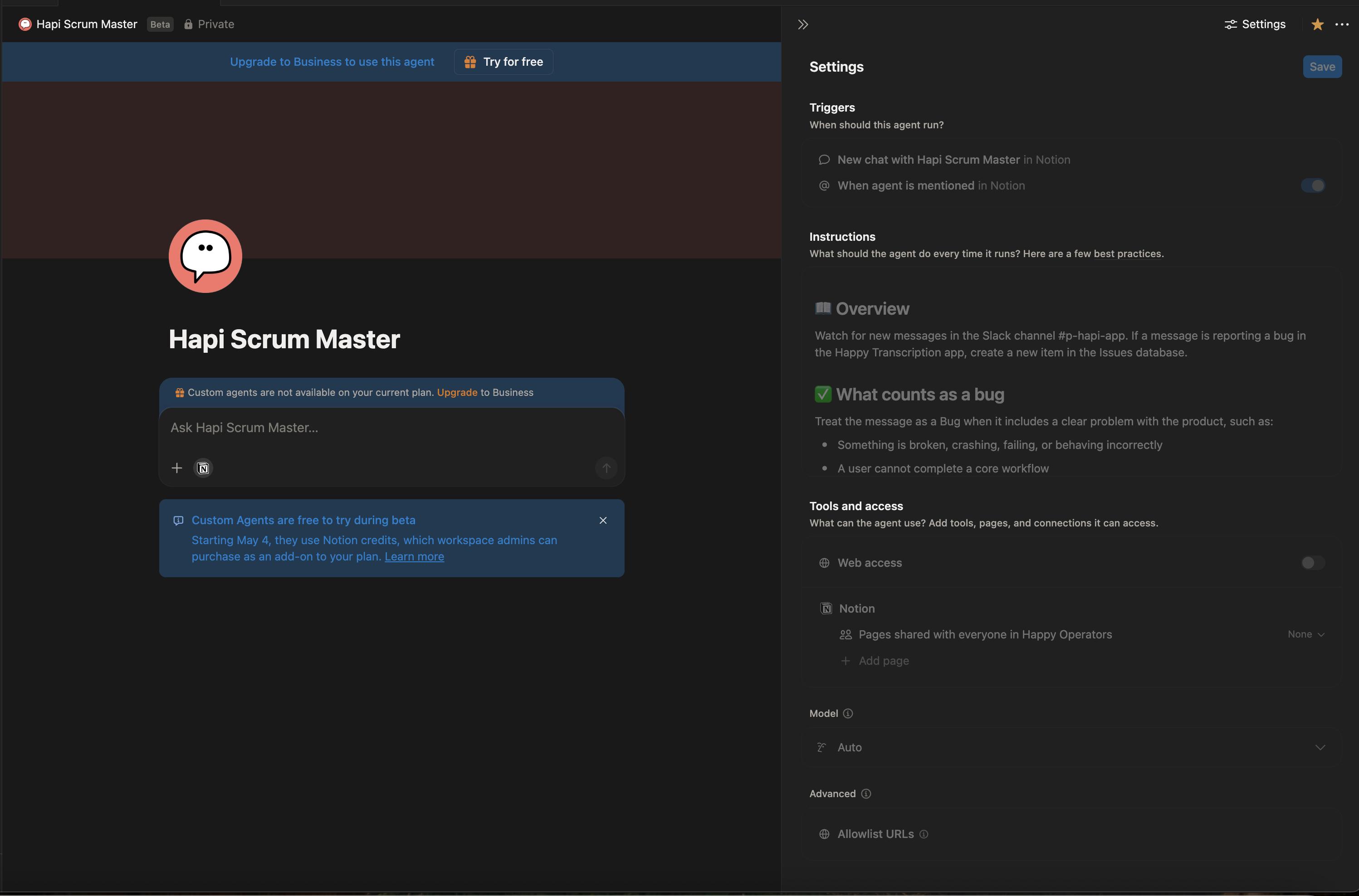
Matt uses a scrum master agent as part of his agency
Each agent has three core components:
Instructions - What job should it do? Start with the desired outcome, then get specific about data sources, format, and examples of good output.
Triggers - When should it run? Schedule it (daily, weekly, monthly) or set event-based triggers (new calendar entries, Slack mentions, email labels).
Tools & Access - What can it see and do? You explicitly grant access to specific pages, databases, email accounts, calendars. Nothing else exists to the agent.
The permissions model is genuinely clever. Agents only access what you specifically allow, and all actions are logged and reversible.
The Economics of Digital Workers
Starting May 2026, custom agents will run on a credit-based system. More complex tasks eat more credits. The critical window is now until May 2026 - everything's free during beta for Business and Enterprise plans.
This creates an interesting ROI calculation. A weekly briefer that saves you 30 minutes of prep time? Probably worth it. An agent that creates duplicate calendar entries because the connector isn't quite reliable yet? Maybe not.
The Three-Question Framework
Question 1: Is this rule-based? If the logic is "when X happens, do Y" with no analysis required, use standard Notion automations. They're free and don't need AI.
Question 2: Is this interactive work? Research, writing, back-and-forth analysis - that's your Personal Agent territory. Don't burn custom agent credits on conversational tasks.
Question 3: Can an agent do this consistently and hand back exceptions to humans? That's the sweet spot. Repetitive analysis, report generation, data processing - with clear escalation paths when human judgement is needed.
What's Actually Working
The accessibility is real. I watched someone build a customer service analyser by describing it in plain English. Within minutes, it was processing emails and generating structured reports.
High-ROI use cases:
- Weekly/daily reports that run once and produce clear output
- Email triage and analysis
- Meeting preparation and follow-up
- Content research and trend analysis
- Customer service pattern recognition
The best agents are narrow, focused, and run infrequently. They're not trying to replace human decision-making - they're preprocessing information so humans can make better decisions faster.
The Rough Edges
This is beta software. Expect inconsistencies, especially with integrations. That meeting organiser sometimes creates duplicate events. Slack triggers only work in public channels. Gmail integration occasionally misses emails.
The bigger trap: don't try to recreate your Personal Agent as a custom agent. It'll burn through credits and work poorly. Keep interactive AI work in your Personal Agent where it belongs.
Beyond Notion's Walls
Advanced users are connecting agents to external platforms via Make.com integrations. This means agents can process data in Notion, then post to LinkedIn, update CRMs, or trigger other automation workflows.
The vision becomes clearer: Notion as the central nervous system where agents process information, with tentacles reaching into every other business system.
This isn't just about productivity software anymore. It's about building a team of digital workers that handle the administrative layer of your business while you focus on strategy, relationships, and creative work.

We love that this is giving so many non-technical people access to teams of agents. Matt, a big Notion user, says:
"Because all your work's inside Notion, I can really see the value of plugging agents on top of that work without having to worry about integrations.
Secondly, you can schedule and trigger so this takes on the concept of OpenClaw or your daily routine being actively managed by Notion. It's like deploying mini digital employees to deal with certain job tasks in the hope that you can be doing the more creative human elements of the work."
For some people this will be the start of their journey into vibe coding and autonomous agents - and we're here for that.
Video: Real-World OpenClaw vs Claude Code - A Power User's Honest Take
Create With friend Matt Roberts from Happy Operators shares his hands-on experience using OpenClaw as a "separate AI employee" for his business ventures. He's set up OpenClaw with its own Gmail, GitHub, and Vercel accounts to manage security risks while experimenting with autonomous workflows. The conversation covers practical implementations like automated blog posting, social media asset management, and even building complete products that scrape Shopify stores and generate content.
What's covered:
- Setting up OpenClaw with sandboxed accounts for security
- Real use cases: automated asset management system built via Telegram
- Comparison between OpenClaw's autonomous scheduling vs Claude Code's power
- Security considerations and the Meta AI email deletion incident
- Updates on the Vibe Coding Games (100+ submitted products!)
- New Bubble MCP server that lets Claude Code directly modify Bubble apps
- Why Claude.md files might actually hurt performance
Why watch: It's an honest discussion about what actually works with autonomous AI agents. Matt's approach of treating OpenClaw as a "separate co-founder" for experimental projects offers a practical framework for anyone curious about AI automation without risking their main workflow.
Final Thoughts
Yesterday's Claude outage was a fascinating glimpse into how quickly we've rewired our daily routines around AI. People who'd never touched an AI chatbot six months ago were suddenly feeling genuinely lost without it.
Claude is down
— Tomasz Łakomy (@tlakomy)
It reminds me of that moment when your phone dies and you instinctively reach for it anyway. We don't just use these tools anymore – we think with them.
Maybe that's not entirely a bad thing, but it's worth asking: when AI becomes invisible infrastructure, what happens to our comfort with uncertainty?