Welcome back, Creators!
It's been another exciting week in AI, but as always, we're trying to see beyond the hype to talk about the tools we actually use.
Yesterday Kieran hosted a Create With Meetup in his hometown of Norwich and had a blast showing off a few of the things he's built over the past five years, along with how his build process and tools have changed! For more discussion on that, check out our latest podcast video later in the email.
 IMG_0158
On Thursday this week James and Kieran will be in Manchester to host another meetup, Unfortunately, it is at capacity, but you can join the waitlist anyway.
Now grab yourself a tea and let's jump in...
On Your Radar
The creator of NodeJS said the days of humans writing code is over
Ryan Dahl
@rough__sea
This has been said a thousand times before, but allow me to add my own voice: the era of humans writing code is over. Disturbing for those of us who identify as SWEs, but no less true. That's not to say SWEs don't have work to do, but writing syntax directly is not it.
— @rough__sea
Vibecode app can now build web apps
Ansh Nanda
Yesterday we launched the first Full-Stack Vibe Coding Platform powered by Claude Code... We gave a free month of vibe coding to 2000 people... We're opening it backup for 24 more hours. Get a free month of building web apps and iOS apps below 👇 https://t.co/8FDF8nBtEc
— @anshnanda
Replit now builds mobile apps
Replit just dropped new mobile development capabilities. This could be huge for indie developers and teams who want to ship mobile apps without the usual complexity circus.
Cursor's AI Agents Built a 3M+ Line Web Browser (By Themselves)
Cursor let hundreds of AI agents run wild for weeks, organising themselves into planners, workers, and judges. One experiment produced a fully functional web browser with over 3 million lines of code, built entirely from scratch using GPT-5.2.
ELI5: Claude Cowork
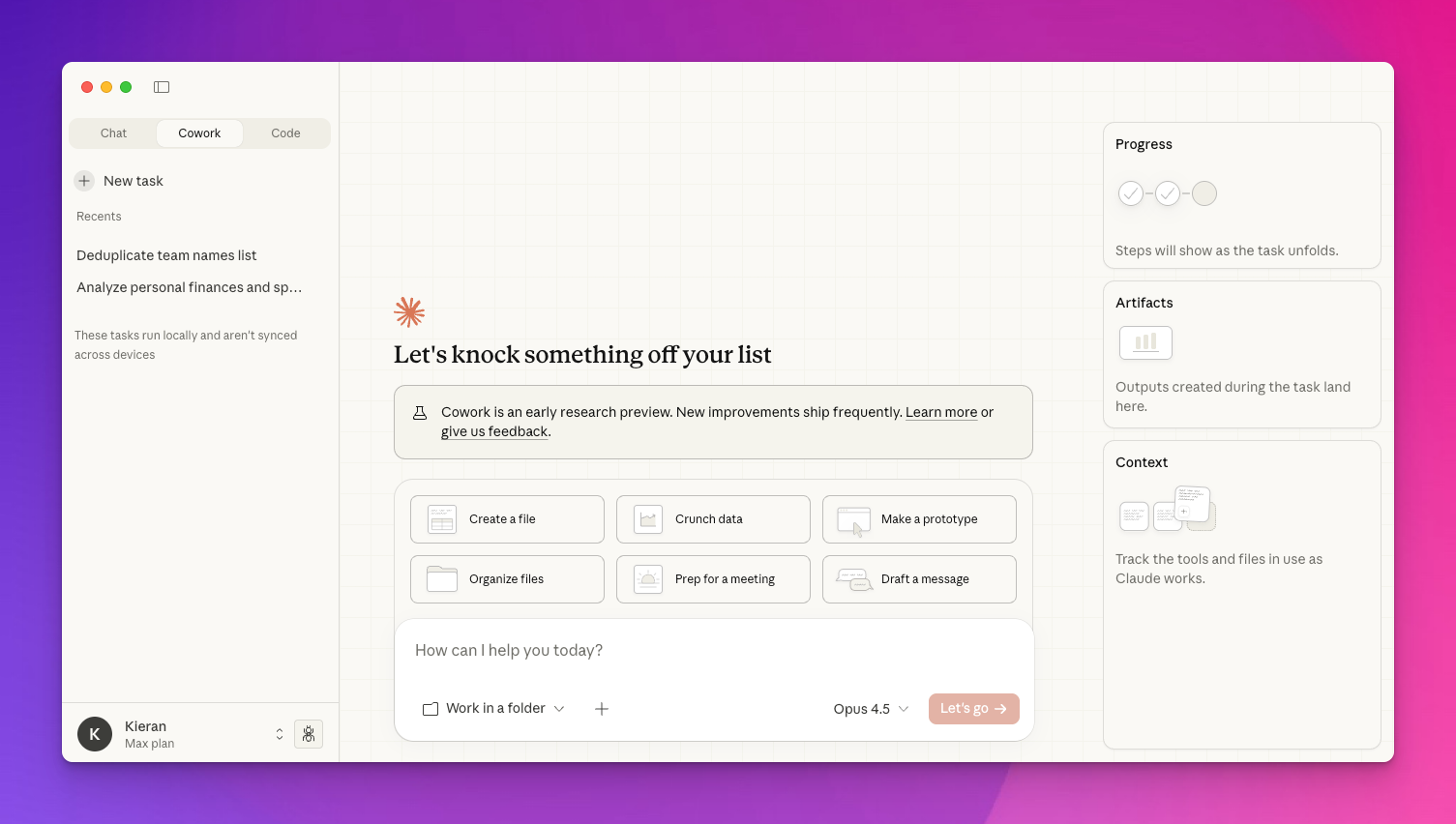
Claude Cowork has just been extended to users on the Claude Pro plan ($20/month) - although still only on Mac - so we thought it's a good time to figure out what it is.
Until now interacting with AI has been primarily through a chatbot interface where the AI is only able to reply with text or images - it can't actually do anything for you.
So a lot of copying and pasting was required.
Claude Cowork changes this by giving the AI a pair of digital hands. It is a new feature in the Claude desktop app that lets the AI actually perform tasks on your computer. It can now open folders, read your documents, and even use your web browser to get work done for you.
It's essentially Claude Code with a friendlier user interface. We like friendly interfaces!
 Xnapper-2026-01-20-11.41.51
How Your New Assistant Works
When you start a project in Cowork, you pick one specific folder on your Mac. This is like giving the AI a project box to work in. It can only see what is inside that folder. It cannot look at your private photos, read your emails, or touch anything else on your computer unless you specifically authorise it.
Once it is inside that folder, it has folder level intelligence. This means it sees everything at once. If you have 50 different files, you can ask one question and Claude will read all of them to find the answer.
Real World Examples
Here are some ways people are using it:
- The Tutor: A student pointed Claude at a messy folder of lecture notes and PDFs from an entire semester. Claude read every file, connected the dots, and automatically built a complete study guide and a family tree of every character mentioned across the different documents.
- The Digital Organizer: One user used it to sort through a giant downloads folder with over 27,000 files. He asked Claude to find one specific picture and then had the AI sort the rest of the mess into neat folders based on file type.
- The Presentation Builder: By connecting Claude to other apps, a user had the AI find company logos in a local folder and automatically insert them into a new Google Slides deck it was building.
- The Browser Pilot: Using a special Chrome extension, Claude can control your browser. One tester had Claude open 10 tabs at once to generate different images for a project. He sat back and watched as the AI controlled the mouse and keyboard to do the work in parallel.
- The Sales Clerk: A business owner had Claude read a spreadsheet of past sales. Claude identified who bought certain hoodies or sneakers and then wrote personalized thank you emails for each customer based on their history.
- The Expense Tracker: A freelancer pointed Claude at a folder of random receipts. Claude read the text on the images to create a live spreadsheet tracking his income and expenses.
Other Suggested Use Cases
Cowork is designed for complex, multi-step work that needs extra time and file access. You can use it for:
- Batch Renaming: You can ask Claude to rename hundreds of files with consistent patterns, like putting everything into a YYYY-MM-DD date format.
- Meeting and Lecture Analysis: Drop in your meeting transcripts or interview recordings. Claude can extract key themes, action items, and patterns you might have missed.
- Advanced Spreadsheets: It can generate Excel files with working formulas like VLOOKUPs and conditional formatting, rather than just basic text files.
- Polished Reports: You can turn rough voice memos and scattered notes into professional documents or charts to visualize your data.
A Truthful Reality Check
Because this is a brand new experiment, you should treat it like a very helpful but slightly clumsy intern. It has some downsides:
- Mistakes with Details: Claude (and most AI) is bad at dates. In one test, it looked at a receipt and got the date completely wrong. You must double check its work.
- Glitches and Loops: The app is still in a preview state. It can be buggy, sometimes forcing you to log in several times or freezing up during a task.
- Risk to Your Files: Since Claude is working on your actual files and not copies, it could accidentally corrupt or delete something. You should always keep a backup of your important data.
How to Get Started
If you have a Claude Pro plan, a Mac and a lot of boring admin tasks or messy files, it is worth a try. Just remember to stay in the loop and watch its work. It is a great way to save time on tedious chores, but it still needs a human to make the final decisions. You'll need the Claude desktop app.
{% if subscriber.tags contains "Create With Pro Member" %} {% else %} {% endif %}
Video: The AI Coding Revolution is Here (Create With Podcast)
In this episode of the Create With podcast, Kieran and James talk about the latest improvements in vibe coding tools like Claude Code and what it means for the future of software development. Only a few months ago Kieran was a vibe coding skeptic but it's safe to say he is now a vibe coding convert!
Final Thoughts
iOS developer Peter Steinberger has built an open source AI assistant called Clawdbot that's gone viral amongst the tech community.
It's still very early days, but people are saying it's the AI assistant Siri never turned out to be.
You interact with it directly from your favourite chat app. And it can proactively message you rather than just waiting for you to trigger it.
André Foeken
To answer what I am currently doing with @clawdbot (question by @liran_tal ): - Check my incoming mail, and remove spam - Check my incoming messages (through @beeper) - Order things for me - Send my reminders to @tana_inc - Create issues on @github - Sync my Google Places (so I
— @dreetje
Definitely something to keep an eye on!
Kieran and James