 Noloco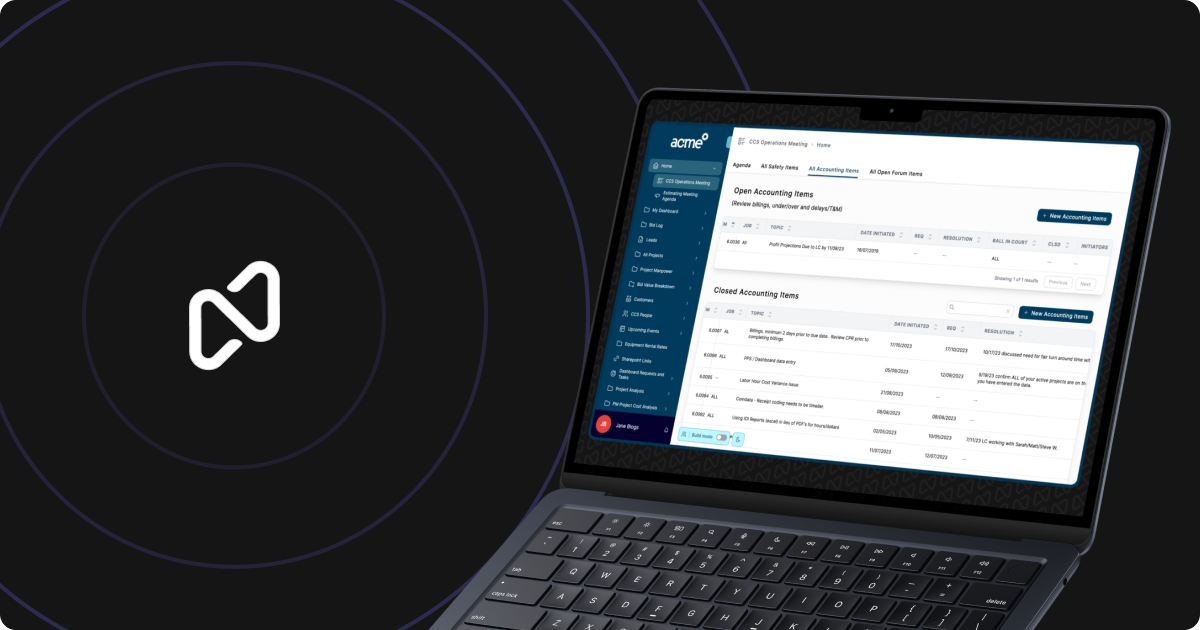
Noloco is pushing AI app generation closer to day-to-day business operations with Canvas, a new way to create custom interfaces by describing what a team needs. Rather than starting with blank pages and manually arranging basic components, users can ask Canvas to build an app around data they already keep in spreadsheets, Airtable, and other connected sources.
The company highlighted the launch on LinkedIn, framing Canvas as a bridge between AI-assisted creation and software that businesses can depend on after the initial build. Potential uses include customer relationship management systems, project trackers, internal tools, and portals shared with clients.
That distinction matters. Generating a prototype from a prompt is increasingly common, but turning one into a reliable operational system still requires structured data, permissions, interfaces, and a way for nontechnical teams to maintain it. Canvas is intended to place the prompt-driven experience inside Noloco’s existing business app platform rather than producing a disconnected demo.
Building Around Data a Business Already Has
Canvas lets a user describe an app in natural language, then uses that request alongside existing business data to assemble the interface. For a service company, that could mean converting client, project, and task records into a portal where staff manage work and customers review progress. A sales team could instead request a CRM organized around its current spreadsheet.
The approach reduces the need to translate a workflow into individual pages and form components before seeing whether the structure works. It also gives less technical operators a faster starting point while keeping the resulting app in the same platform used to run the process.
Noloco quoted early users comparing the experience to “vibe-coding, without worrying about what’s happening behind the scenes.” Another user said Canvas provided a better option after they struggled with more basic forms. These are company-selected testimonials rather than independent benchmarks, but they indicate where Noloco expects the feature to resonate: teams that understand their workflow and data, yet do not want to construct every screen manually.
Canvas was initially introduced as a way to build custom app interfaces with AI descriptions. The newer update emphasizes the broader proposition. Users are not only generating an interface, they are expected to operate the business through it and expose appropriate parts of the system to clients.
What Small Teams Should Evaluate
For small businesses, the main attraction is consolidation. A company may already have its records but still rely on separate forms, shared spreadsheets, and email threads to move work forward. Canvas could shorten the process of turning those records into one role-specific workspace.
Prospective users should still examine the generated app as they would any operational system. In particular, teams should verify:
- whether fields and relationships accurately reflect the underlying data;
- which information employees and clients can view or edit;
- whether generated forms support the required workflow;
- how changes can be reviewed and reversed.
That last point is relevant because Noloco has also extended app version history with rollback and change tracking. AI may accelerate the first build, but controls for inspecting and undoing changes remain important when the app contains live client or operational data.
Canvas does not eliminate the need to define a sound process. If a spreadsheet contains inconsistent records or a team has not agreed on how work should progress, a generated interface will not resolve those underlying issues. Its practical value is in reducing implementation work once the data and desired workflow are sufficiently clear.
Noloco says Canvas can be tried free through its website. The announcement does not specify which paid plan is required for ongoing use or how usage is measured.
Frequently asked questions
What is Noloco Canvas?
Noloco Canvas is an AI-powered app-building feature that turns natural-language descriptions into business app interfaces. It can use existing data from spreadsheets, Airtable, and other connected sources to create tools such as CRMs, project trackers, and client portals.
Who is Noloco Canvas for?
Canvas is aimed at teams that need custom operational software but do not want to design every page and form manually. It is particularly relevant to service businesses building shared systems for employees and clients around existing business data.
Can Noloco Canvas be used for free?
Noloco’s announcement says users can try Canvas for free on its website. It does not provide details about paid-plan requirements, AI credit limits, or the cost of continued use.
Sources
1 checkedHow we cover tool news: Create With's tool desk drafts these reports with AI from the sources listed above and checks them against those sources before publishing.

 Supabase
 Jotform
 Gemini
 Figma
Figma
 Vercel