 Figma
Figma
Embedded AI for Design Teams
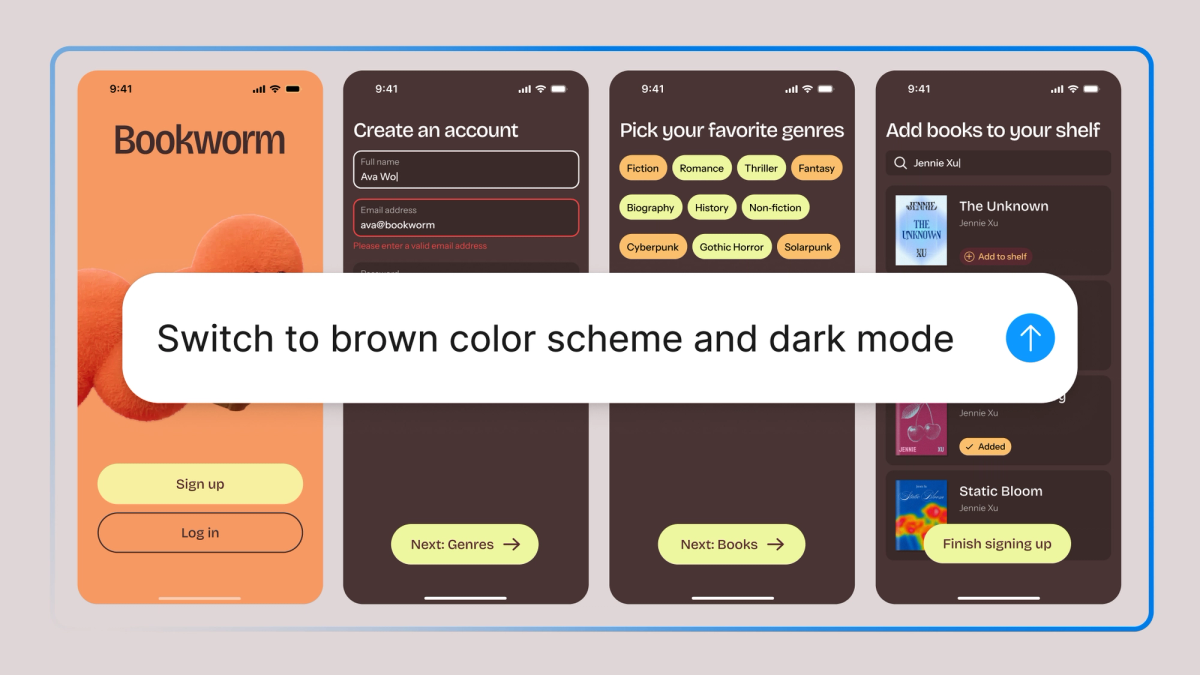
Figma has launched a new AI agent that lives directly on the design canvas, positioning it as a native tool for design workflows rather than a separate assistant. The company announced the rollout on LinkedIn, describing the agent as fluent in Figma and built for how teams already work. The feature is rolling out gradually over the coming weeks, with interested users able to join a waitlist at figma.bot/agent.
The move comes as design tools increasingly embed AI capabilities directly into core workflows. Unlike standalone assistants or separate panels, Figma's agent appears on the canvas itself, suggesting a tighter integration with design tasks like prototyping, component management, and collaboration.
What the Agent Does
While Figma's announcement remains light on technical specifics, the positioning as "native to the way your team works" implies the agent can assist with tasks already common in Figma, such as generating design variations, automating repetitive workflows, or surfacing design system components. The emphasis on being "fluent in Figma" suggests the agent understands design files, layers, components, and team conventions rather than operating as a generic chatbot.
Figma has been steadily building its AI toolkit. The company recently added custom skills to Figma Make for reusable workflows, shipped voice-to-text and version history to Make, and introduced text-on-path and auto layout to Draw mode. The design agent represents a natural evolution of these efforts, consolidating AI capabilities into a unified assistant.
Context in the Design Tool Space
Figma's agent arrives amid a broader push by design and development platforms to integrate AI more deeply. Lovable and Bolt have popularized vibe coding for rapid prototyping, while Cursor and Windsurf embed AI directly into code editors. In the design space, Framer and Webflow have both added AI-assisted design features over the past year.
For Figma, embedding an agent on the canvas aligns with its collaborative ethos. Design teams often work in real time on shared files, and an agent that understands those workflows could reduce friction in tasks like generating component variants, auditing design systems, or suggesting layout improvements based on team conventions.
The gradual rollout suggests Figma is testing the agent with select users before broader availability. The waitlist approach mirrors the company's launch strategy for earlier AI features, allowing Figma to refine behavior based on early feedback.
What Designers Should Watch
Key questions remain about the agent's capabilities. Can it generate full design mockups from text prompts, or is it limited to smaller tasks like resizing frames and updating components? How does it handle context from design systems and existing files? Does it integrate with Figma's Dev Mode for handoff to engineers?
Figma has positioned itself as a hub for design and development collaboration, and an agent fluent in both design and code could bridge the gap between prototyping and production. The company has explored AI-assisted workflows in recent release notes sessions, hinting at deeper integrations with development tools.
For small teams and solo builders using Figma alongside tools like Bubble, Webflow, or Glide, an on-canvas agent could streamline design-to-build workflows, especially if it can export components or generate code snippets compatible with no-code platforms.
Interested users can join the waitlist at figma.bot/agent. More details are expected as the rollout expands.
Sources
1 checkedHow we cover tool news: Create With's tool desk drafts these reports with AI from the sources listed above and checks them against those sources before publishing.



 Stripe
 Supabase
 Airtable
 Adalo
Adalo
 Squarespace
 ElevenLabs