 Jotform
Jotform has launched as the first form builder integrated into ChatGPT's app marketplace, allowing users to build and manage forms entirely within the ChatGPT interface.
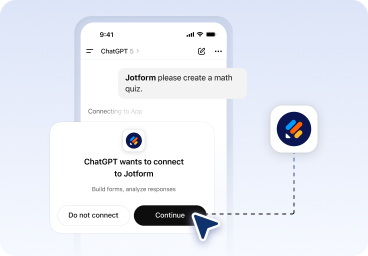
The integration enables users to tag Jotform in ChatGPT, connect their account, and then create, edit, and analyze forms through conversational prompts. According to the company's announcement page, the workflow covers form creation, editing, design customization, and response analysis without requiring users to switch between tools.
Creating and Refining Forms Through Conversation
Users start by prompting ChatGPT to generate a form, which appears in seconds. From there, they can modify the form by adding or removing fields, reordering questions, adjusting settings, or changing themes and layouts through follow-up messages. The system handles both structural changes and visual design elements within the same conversational flow.
The app supports filtering submissions by date, status, keywords, or specific field values. Users can then ask ChatGPT to summarize insights, identify trends, or recommend improvements based on response data.
Analysis and Data Review
Beyond creation, the integration handles submission management. Users can list existing forms, pull submission data, and analyze responses directly in chat. ChatGPT can surface patterns in the data, generate summaries, or flag areas for form optimization based on how respondents are filling out fields.
This approach positions Jotform as part of a broader trend of productivity tools embedding themselves into AI platforms. Canva recently launched its own agent within Jotform's ecosystem, and several workflow tools have added conversational interfaces for task automation.
Technical Implementation
The ChatGPT integration works through OpenAI's app framework, which allows third-party services to authenticate users and execute actions on their behalf. Users authorize Jotform once, then interact with their forms through natural language rather than navigating the Jotform interface directly.
For teams already using ChatGPT for other workflows, this integration removes the friction of context-switching. Form creation becomes a step in a larger conversational process rather than a separate task requiring a new browser tab and interface.
The feature is available now to ChatGPT users with a Jotform account. Jotform has not disclosed whether the integration will remain exclusive to OpenAI's platform or expand to other AI assistants like Claude or Gemini.
According to Jotform's research page, the company has been investing heavily in AI-powered form tools, including its standalone AI form builder and various automation features. The ChatGPT integration builds on that foundation by embedding form management directly into an environment where many users already spend time drafting content, brainstorming ideas, or managing workflows.
Sources
1 checkedHow we cover tool news: Create With's tool desk drafts these reports with AI from the sources listed above and checks them against those sources before publishing.





 ElevenLabs
 Glide
Glide
 Stripe